Youth Sports RSVP Tracking: A Simple System for Coaches and Parents
The best way to track youth sports RSVPs is to put the question where families already look, tie it to the schedule, and set a deadline. Then you read one summary instead of forty text replies. Group texts bury answers, and a thumbs-up emoji is not a headcount. A team app that keeps RSVPs next to the event fixes that. In Athlo (athloapp.com), team management keeps the schedule, chat and RSVPs in one place, and the parent can answer for a child who has no phone.
This guide covers what to ask, when to ask it, how to chase the silent families, and what to do when plans change at 4 p.m. on game day.
TL;DR
- An RSVP is a plan. Attendance is the record of who actually showed. Track both, separately.
- Ask a yes/no question per event, per child, with a deadline set before the event is posted.
- Send one reminder to non-responders, then a direct message to the stragglers. Stop there.
- Decide a go/no-go threshold in advance so the numbers make the call, not your nerves.
- Treat kids’ information as sensitive: collect the minimum and share it only with the people running the team.
Table of Contents
- RSVP vs. attendance: two different lists
- What a good RSVP request includes
- When to ask, and when families should answer
- How parents report whether a child can attend
- How to chase the families who have not answered
- Late changes, cancellations and no-shows
- Using RSVPs to decide go or no-go
- Keep kids’ information safe
- Our perspective on RSVP tracking
- Put it into practice with Athlo
- FAQ
- Sources
RSVP vs. attendance: two different lists
Coaches mix these up all the time. One scouting-style documentation page draws the line cleanly: an RSVP is a family’s plan, while attendance is the after-the-fact record of who showed. It also describes setting an RSVP deadline when you create the event, and letting leaders edit responses on a family’s behalf after that deadline passes.
Why it matters:
- RSVPs help you plan: how many cones, how many jerseys, whether you have enough for a scrimmage.
- Attendance helps you look back: who is consistent, who is drifting away, who needs a nudge.
- The gap between the two is your no-show rate. If you only track one list, you never see it.
What a good RSVP request includes
Keep it small. Every extra question lowers your response rate. A solid request has:
- The event, the time and the place. Include arrival time, not just start time. “Game at 10” and “be there at 9:15” are different promises.
- A clear choice per child. Attending or not attending. Families with two kids on one team should answer once per child.
- An optional note. “Late, dentist” or “leaving early” saves you a call. Columbus Soccer Club asks families to mark each child Attending or Not Attending, with an optional note, so the coach gets one summary.
- A deadline. Say it in the event itself: “Reply by 8 p.m. Thursday.”
- What happens next. “If we have fewer than eight, we cancel and tell you by Friday noon.”
Skip anything you do not need. You do not need a child’s medical history to count heads for practice. Forms and waivers are a separate job, handled once per season.
When to ask, and when families should answer
Timing depends on the event:
| Event | Ask | Deadline |
|---|---|---|
| Weekly practice | Same day each week | 24 hours before |
| League game | When the schedule posts | 48 hours before |
| Tournament or travel weekend | As soon as dates are known | One week before |
| Pickup run | When you post it | A few hours before, or the night before |
Two habits help. First, make the ask predictable: if RSVPs always go out Sunday night, parents build the habit. Second, set the deadline early enough that you can still act on it. A deadline an hour before tip-off is a wish, not a deadline.
For more on how messages land with families, see our piece on game day communication tactics for youth teams.
How parents report whether a child can attend
Parents are busy and often managing more than one kid. Make answering a ten-second job: one tap per child, from the phone, without logging into three systems. If your families are juggling several kids on several teams, following multiple kids’ sports without the chaos is worth a read to share with them.
A parent portal helps here too. Athlo’s parental view lets a parent manage a child’s sports life from one account, and the child does not need a device or an account of their own. Here is how that works in practice: a parent portal for youth sports.
One small tip from the sideline: tell families what you want to see. A team that wears matching gear reads as a team, and some coaches order custom team t-shirts in bulk once the final roster is locked. That is another reason to have a clean headcount early.
How to chase the families who have not answered
Silence is the real problem. Most families are not saying no, they just forgot. Use a short ladder:
- Reminder one, to non-responders only. Send it the day before the deadline. Do not blast the whole team, since the families who answered will tune you out.
- Reminder two, a direct message. A short, friendly one: “Need a yes or no on Saturday. Takes five seconds.”
- Mark them yourself. After the deadline, a coach can still add or change a response on a family’s behalf. Message the parent, get a quick answer, and update the list.
The whole point is that one summary shows who has not answered. If you are scrolling a group chat to work that out, you are doing the app’s job by hand. Set up a clean chat and keep RSVPs out of it: how to set up and manage sports team chat.
Late changes, cancellations and no-shows
Plans change. Build rules before they do.
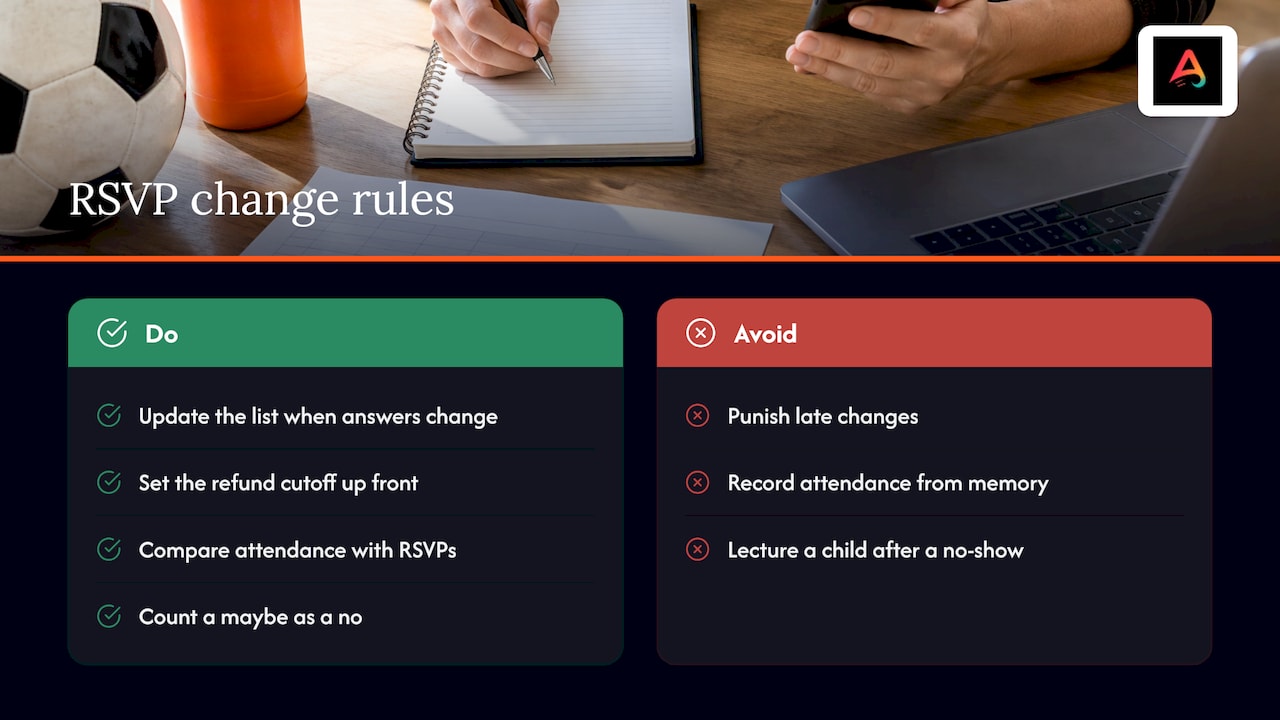
Late changes. Let families switch their answer right up until the event, but tell them a switch from yes to no after the deadline needs a message to you directly. That keeps the list honest without making anyone feel punished.
Cancellations. If an event is paid, such as a pickup run or a clinic, decide the refund cutoff up front and post it with the event. People accept a rule they saw in advance.
No-shows. Record attendance at the event, not from memory afterward. Compare it with RSVPs. A kid who says yes and does not show twice in a row is worth a friendly check-in, not a lecture. Often it is a ride problem.
Pickup games. Pickup dies the same way every time: eight people say “maybe,” four show up, and the game fizzles. Ask for a firm yes, and treat a maybe as a no for counting purposes.
Using RSVPs to decide go or no-go
Decide the number before you see the responses. For example:
- Basketball pickup, 5-on-5: need ten. Go at ten yes responses, cancel below eight.
- Soccer practice: need at least a goalkeeper and enough for a small-sided game.
- Team scrimmage: need enough to field both sides, or you adjust the format.
Add a cushion. If your sport needs ten, plan on a few extra yeses because some will not show. Look at your own no-show rate from past events to pick the cushion. Then announce the decision at a set time, so families can plan their day.
LinkUp, Athlo’s pickup game discovery, is built for this kind of game: players find and organize games near them, with QR-based attendance and payment. See LinkUp pickup games.
Keep kids’ information safe
An attendance list is a list of children’s names and sometimes their schedules and contact details. Treat it that way.
- Collect only what you need. One youth platform states that it collects only the minimum personal data necessary and does not knowingly collect information from children under 13 without verifiable parental consent.
- Know your responsibility. One national sports ID service’s terms say that when coaches or directors download rosters, they are solely responsible for safeguarding the data and limiting its use to league or tournament operations.
- Share with the people who run the team, not the whole parent group.
For a fuller walkthrough, read youth sports data privacy for parents and organizers.
Our perspective on RSVP tracking
Most RSVP systems fail for a boring reason: the question lives in one place, the schedule in another, and the answers in a third. Coaches end up as unpaid secretaries.
We built Athlo to put it all in one free app: team management, chat, events, forms and waivers, and a parental view. The goal is simple. A coach opens the app and sees who is in. A parent answers in seconds. Nobody chases anyone through a group text.
Protect the vibe like it’s the product. A team that knows the plan, and trusts the list, shows up.
Abdulazeez
Put it into practice with Athlo
Athlo is free on iOS and Android, with Athlo Plus at $3.99 per month and Athlo Pro at $7.99 per month for upgrades. Team Management brings schedules and team sync together with team chat, and parents can manage a child’s sports life from one account.

If you run pickup games, events or coaching sessions, you can also take payments in the app, with QR-verified entry. Start at athloapp.com.
FAQ
What is the difference between an RSVP and attendance?
An RSVP is what a family says they plan to do. Attendance is the record of who actually showed up. Tracking both shows you your no-show rate and helps you plan better next time.
How far ahead should I ask for RSVPs?
For weekly practices, ask about 24 hours ahead. For games, 48 hours is a good window. For tournaments and travel, ask a week or more out. Always set the deadline when you post the event.
What do I do about parents who never respond?
Send one reminder to non-responders only, then a short direct message. After the deadline, you can still mark a response for them once you hear back.
How many RSVPs do I need before a pickup game goes ahead?
Pick the minimum before you post. For 5-on-5 basketball, ten yeses is a safe go, and below eight is a cancel. Count “maybe” as no.
Sources
- Recreational soccer, Columbus Soccer Club
- RSVPs and attendance, TroopBook
- Terms of Service, National Sports ID
- Privacy Policy, BV1 Player Development
Ready to get your team’s RSVPs out of the group chat? Download Athlo free on the App Store or Google Play.
Recommended
- Practice Attendance Tracking: A Simple System for Coaches
- Parent Guide to Youth Sports Schedules Without Chaos
- Protect Minors and Pin RSVPs: Youth Team Chat Etiquette and Templates
- Parent Portal for Youth Sports: What It Is and How to Use It