Research Backed Game Day Communication Tactics for Youth Teams
The simplest way to kill game-day chaos is one official event, one RSVP list, mobile QR tickets, one team channel everyone actually watches, and clear roles for who handles what. Athlo (athloapp.com) bundles most of this into a single app if you’d rather not stitch together five different tools.
TL;DR:
- Confirm RSVPs and final roster details at least 24 hours before the game to prevent last-minute scramble and lineup issues.
- Use a designated official communication channel for schedule and RSVP updates, with SMS or app push alerts for urgent changes.
- Assign specific roles with clear names for tasks such as gate scanning, scoring, and safety checks, with backup personnel identified.
- Deliver tickets via SMS with wallet passes and use offline QR codes to avoid delays at the gate, minimizing contact and scanning issues.
- Prepare backup plans, including paper rosters and manual entry checks, to handle technology failures or connectivity issues on game day.
Table of Contents
- What Should Coaches Check 24 to 48 Hours Before Game Day?
- Which Communication Channels Should You Use, and When?
- Who Handles What From 90 Minutes Before Kickoff to the Final Whistle?
- How Do You Set Chat Etiquette and Protect Minors in Team Communication?
- How Do You Run Mobile Ticketing and Entry Without Bottlenecks?
- What’s the Backup Plan When Messages or Tickets Fail?
- How Athlo Fits Into This Playbook
- Get the Whole Playbook in One App
- Sources
- FAQ
What Should Coaches Check 24 to 48 Hours Before Game Day?
The 48-hour window before kickoff is where most game-day disasters actually get born. A missed RSVP on Wednesday becomes a lineup scramble on Saturday morning. Work through this list in order:
- Lock RSVPs. Send a final “who’s playing” ping and set a hard cutoff. No response by the deadline means the player’s a maybe, not a lock.
- Confirm roster and starting lineup. Post it once availability is final, not before.
- Push tickets and entry instructions. Send QR tickets or gate instructions early enough that families aren’t hunting for them in the parking lot.
- Assign your people. Name who’s running the gate, who’s keeping score, and who’s the designated safety parent for the day.
- Check the boring stuff. Medical forms, waivers, equipment bags, arrival times, and parking. This is the pile that gets skipped when everyone’s focused on the game plan, and it’s the pile that causes the worst Saturday morning fires.
Which Communication Channels Should You Use, and When?
Every team eventually drowns in channels: a group chat, a phone tree, a school email list, maybe a shared spreadsheet nobody opens. The fix isn’t picking one channel and banning the rest. It’s assigning each channel a job.
- One official channel is the source of truth. Pin the schedule and RSVP link there and treat every other channel as secondary.
- SMS or app push handles urgent changes like a rained-out field or a moved start time. These need to land in seconds, not get buried in a 40-message thread.
- Email carries detailed, non-urgent information: season calendars, tournament packets, waiver reminders.
- Group chat is for coordination, not official record. Carpool logistics and “who’s bringing snacks” belong here, but the actual RSVP and schedule stay pinned in the official channel so nobody has to scroll to find them.
- Tickets should work without forcing a download. SMS-delivered links that add to Apple Wallet or Google Pay clear the gate faster than making a parent install an app five minutes before first pitch, and they still scan offline if the venue’s cell signal is spotty.
Parents already lean heavily on group chats for day-to-day updates, but research on parent-coach communication finds they consistently rate structured updates and scheduled check-ins as more useful than the chat firehose. Chat is fast. It’s not always effective.
Pro Tip: Rename your official channel something boring and obvious, like “Team 12U Official Updates.” A clever nickname gets ignored. A boring, literal name gets read.
Who Handles What From 90 Minutes Before Kickoff to the Final Whistle?
A game-day timeline only works if it’s assigned to actual names, not vague roles nobody owns. Copy this template and fill in the blanks with your roster.
- 90 to 60 minutes out: Send the final attendance confirmation and post the lineup. Anyone who no-showed on the RSVP gets a direct check, not a group blast.
- 30 minutes out: Push arrival reminders with parking and gate instructions. This is also when equipment checks happen, cleats, mouthguards, water bottles, before kids are standing at the gate without them.
- At the gate: One person scans tickets, checks names against the roster, and handles failures on the spot rather than pulling the whole line aside.
- During the game: A designated scorer or a live-feed volunteer posts real-time updates during games so parents stuck at work or watching a sibling’s game elsewhere aren’t texting “what’s the score” every ten minutes.
- Postgame: Send a short wrap-up: final score, next practice, any equipment to return. Close it with a quiet reminder of the 24-hour rule, more on that below, so heated postgame texts get a night to cool off before they get sent.
Assign a backup name to every role above. The scorer who’s also the team parent and the snack coordinator will eventually be in three places at once.
How Do You Set Chat Etiquette and Protect Minors in Team Communication?
A team chat without rules turns into a group project nobody signed up for. Pin a short etiquette policy at the top of your official channel covering tone, response windows, and how to report a problem message. It takes five minutes to write and saves weeks of cleanup later.
- Publish a one-paragraph etiquette policy and pin it, don’t bury it in a group chat scroll where nobody will find it again.
- Enforce the 24-hour rule: no lineup complaints, referee gripes, or playing-time arguments get sent the night of the game. Sleep on it first.
- Limit one-on-one messages between coaches and minors. Route anything substantive through a parent-copied channel instead.
- Remind families that medical forms and waivers need to be done before they arrive, not filled out standing at the gate while a line forms behind them.
Peer-reviewed research on coach-parent relationships backs the 24-hour rule specifically, finding that open, honest communication paired with a cooling-off period for heated incidents improves trust between coaches and families over a season. Athlo’s own chat etiquette templates exist for exactly this reason: most teams don’t have a policy until after the first blowup, and by then it’s too late to look proactive.
How Do You Run Mobile Ticketing and Entry Without Bottlenecks?
Gate lines back up for one reason more than any other: someone’s fumbling for a ticket they can’t find. Fix the delivery method and the line moves.
- Deliver tickets by SMS with a wallet pass, not a mandatory app download. Nobody wants to create an account in line.
- Use QR codes that scan offline and sync entry logs once the connection comes back. Youth fields are notorious for weak signal.
- Go cashless for speed, but staff one person as a cash fallback for the family who shows up without a phone.
- Send parking and gate maps ahead of time. Half of “where do I go” confusion disappears if the map arrives Thursday instead of getting texted at the gate.
Cash now accounts for a minority portion of U.S. consumer payments according to the Federal Reserve’s 2026 diary of consumer payment choice, which is exactly why a cashless-first gate policy isn’t a risky bet anymore. It’s how most families already expect to pay.
What’s the Backup Plan When Messages or Tickets Fail?
Every setup fails eventually. A phone dies, a coach hits traffic, a QR code won’t scan. The difference between a five-minute hiccup and a genuine mess is whether you planned for it.
- Keep two emergency contacts per family on file, plus one broadcast SMS number the whole team can text if the main channel goes down.
- At the gate, verify the name against the roster, hand over a paper pass, and log the entry manually for your records.
- If a coach is running late, a named deputy confirms the lineup and starts the game on time. Don’t wait and hope.
- Write down what happened after any incident, once things have calmed down, so it doesn’t repeat next month.
How Athlo Fits Into This Playbook
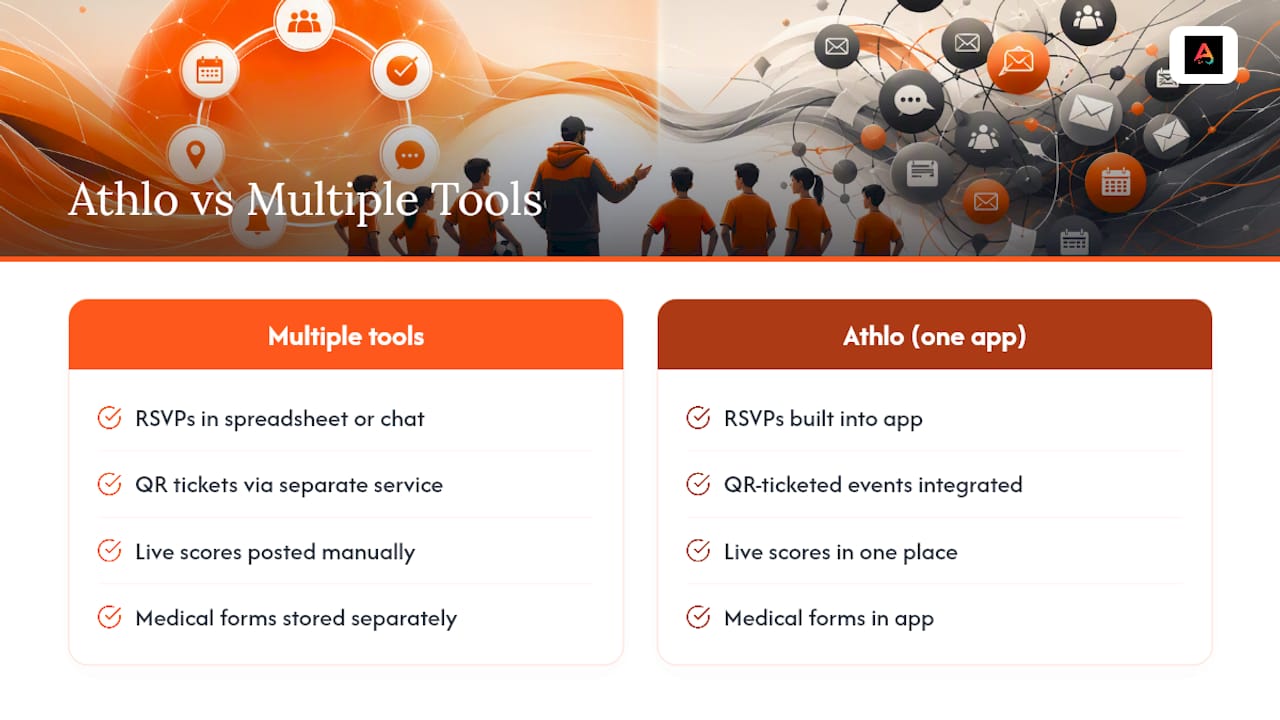
Everything above works with a spreadsheet and a group chat if you’re disciplined about it. It works faster in one app. Athlo (athloapp.com) puts RSVPs, QR-ticketed events, live scores, medical forms, and pickup-game discovery through LinkUp in one place, so a coach isn’t juggling five separate tools to run one Saturday. Parents get a single view instead of piecing together texts, emails, and a printed schedule taped to the fridge. This isn’t the only way to run game-day logistics well. It’s just the version where the pieces already talk to each other.
Get the Whole Playbook in One App
Centralized RSVPs, QR tickets that scan at the gate, and live scores parents can actually follow, are the entire playbook from this article running in one app instead of five separate tools. Download Athlo on the App Store or Google Play and set up your first event before your next game weekend.
If your team runs on a coaching marketplace model, paid sessions or organized coaching outside the team itself, Athlo’s coaching marketplace handles that side too, with secure payments built in so you’re not chasing anyone down after the fact. And if pickup games are more your speed than organized league play, LinkUp is built specifically for finding and hosting those.
Sources
- Exploring the development of coach-parent relationships in organized competitive youth team sports | PLOS One
- Parent Attitudes Toward Sport Coach Communication and Knowledge: Exploring Priorities, Goals, and Expectations in the Fee-Based Youth Sports Ecosystem
FAQ
What’s the single biggest game-day communication mistake?
Running your RSVP, schedule, and ticket delivery through three separate tools instead of one official channel. Families miss updates because they don’t know which platform actually has the current information.
What is the 24-hour rule in youth sports communication?
It’s a policy of waiting 24 hours before sending a message about a heated issue like playing time or a referee call, giving both sides time to cool off. Research on coach-parent relationships supports that this practice improves trust between coaches and families over a season.
Should tickets require downloading an app?
No. SMS-delivered tickets that add to a mobile wallet clear gates faster than forcing a download, and they still work if a family’s data connection drops. Apps like Athlo support QR entry without requiring every parent to create a new account on game day.
How should coaches talk to parents about playing time or conflicts?
Digital updates work for logistics, but parent-coach research shows scheduled, structured conversations are rated far more effective for sensitive topics than a group chat message.
What happens if the venue has no cell service on game day?
Use QR tickets and check-in tools built for offline scanning, then sync entry logs once connectivity returns. Keep a paper roster as backup so gate staff can verify names manually if digital scanning fails entirely.