Coaches: Set Up and Manage Sports Team Chat in 20 Minutes with Athlo
The most reliable way to manage sports team chat is with one dedicated app that combines messaging, RSVPs, and youth-safety controls, and Athlo is built for exactly that job. It replaces the group text that spirals into 200 unread messages with structured channels, pinned announcements, guardian accounts, and attendance tracking in one place. The rest of this guide walks through why loose group texts fail, which features actually matter, and how to set up a clean system in one sitting, complete with copy-paste message templates.
TL;DR:
- A structured team chat app with separate channels for announcements, logistics, and staff-only communication reduces message overload and enhances focus.
- Enforcing guardian accounts for minors, attaching digital waivers to events, and verifying RSVPs against rosters are essential for youth sports safety and liability reduction.
- Initial setup, including creating channels, loading calendars, and running test messages, takes about 20 to 45 minutes and significantly cuts ongoing administrative time.
- Connecting the chat system with roster data, forms, and payment processes ensures consistent information flow and minimizes manual updates across platforms.
- Athlo offers an all-in-one solution with guardian accounts, pinned documents, RSVP tracking, and moderation controls, accessible via mobile and desktop, starting with a free plan.
Table of Contents
- Why Organized Team Chat Matters for Coaches, Managers, and Parents
- Key Features to Prioritize When You Set Up a Sports Team Chat
- Step-by-Step: Set Up a Clean, Safe Team Chat in One Session
- Safety, Privacy, and Youth-Specific Rules Every Team Must Enforce
- Ready-to-Use Message Templates and Workflows Coaches Can Copy
- Integrating Chat With Roster, Forms, Payments, and Game-Day Workflows
- Moderation Policy, Escalation Steps, and Low-Effort Governance
- How Chat Fits Into the Rest of Your Sports Management Setup
- Can You Manage Team Chat Across Phone, Desktop, and Web?
- Author Perspective: A Coach-First Take on What Really Works
- How Athlo Solves This in One App
- Sources
- FAQ
Why Organized Team Chat Matters for Coaches, Managers, and Parents
Every coach has lived this: a rec league group text hits 340 messages by Wednesday night, half of them are “running 5 late,” and somewhere in there is the one message that actually mattered, the field change nobody saw until three families showed up at the wrong park. That is not a communication problem you can fix by typing faster. It is a structure problem.
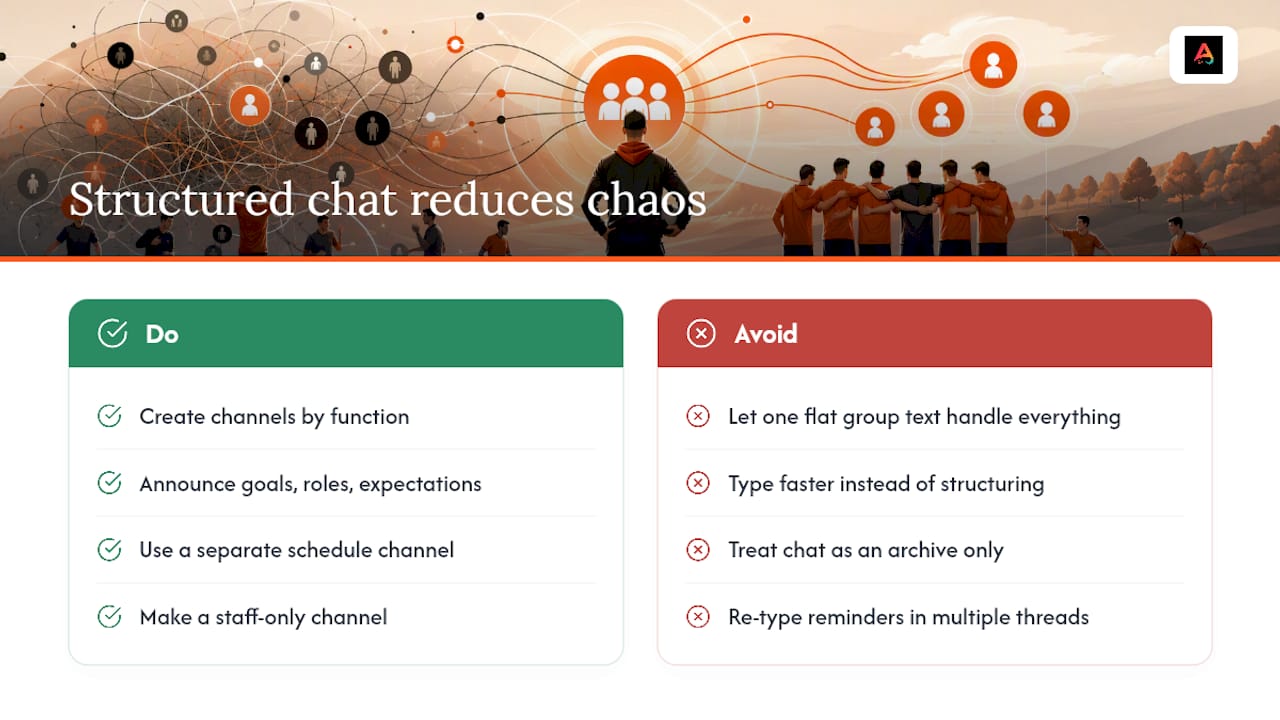
Research on team communication points to a specific mechanic behind this chaos: effective team leadership works by managing what researchers call “variable uncertainty,” not by trying to control every single interaction. Coaches who reduce uncertainty through explicit, out-loud communication on goals, roles, and expectations build stronger team cohesion than coaches who just talk more. The lesson translates directly to chat: a flat group text where announcements, jokes, RSVPs, and carpool logistics all live in the same feed maximizes uncertainty. Nobody knows where to look for the thing that matters.
There is also a coordination angle worth understanding. An ecological perspective on intra-team communication argues that communication inside a team works by directing collective attention toward shared needs in real time, not by archiving information for later. A team chat that just piles up messages fails that job. A team chat organized by function, announcements here, schedule there, staff-only concerns somewhere else, actually does what communication is supposed to do: point everyone’s attention at the same thing at the same time.
Youth sports participation is climbing, and that raises the stakes on getting this right. State of Play 2025 participation data shows more families getting pulled into organized youth sports, which means more parents juggling multiple kids, multiple teams, and multiple group chats competing for their attention. A coach running three teams during a busy season cannot afford to retype the same practice reminder in three different text threads.
The payoff for fixing this is not abstract. Teams with a clear, structured chat system see fewer missed practices, fewer “wait, what field?” texts on game day, and less time spent by coaches doing unpaid admin work at 9 p.m. That time savings alone is worth the twenty minutes it takes to set the system up properly, which is what the next section covers.
Key Features to Prioritize When You Set Up a Sports Team Chat
Not every messaging app deserves a spot on your team. Before you commit to one, run it against this checklist. If it is missing more than one or two of these, keep looking.
Channel structure that matches how information actually flows. You want separate lanes for announcements, practice logistics, game day, and staff-only conversations. Mixing these into one thread is the single biggest reason team chats turn into noise. An ecological perspective on intra-team communication backs this up directly: channel structure should map to function, not to whoever happens to be typing at the moment.
- Push notifications with priority levels so an emergency alert does not get buried under casual chatter.
- Pinned announcements for anything a parent needs to reference more than once, like a field address or uniform policy.
- Read receipts or delivery confirmation so you know who has actually seen the “practice moved to 6 p.m.” message, not just who received it.
- Built-in calendar with RSVP tracking, including sync to personal calendars, so attendance is a tap instead of a reply buried in a thread.
- Secure file and media sharing for drill diagrams, play sheets, and team photos, with limits on who can post to protect younger players.
- Parental controls and privacy settings, meaning guardian accounts that never expose a kid’s phone number or require them to have their own device.
- Moderation tools and role permissions so coaches and team managers can mute, remove, or restrict posting without needing to be online 24/7.
- Audit logs or message history that let you find what was actually said if a dispute comes up later.
That last one matters more than most coaches expect. When a parent disputes what was communicated about a schedule change, having a searchable, timestamped record settles it in ten seconds instead of turning into a memory contest.
Pro Tip: Pin the season schedule and code of conduct as the very first posts in your announcements channel, before you invite a single family. New parents will scroll to the top before they scroll anywhere else, and that first impression sets the tone for how seriously the team takes communication.
The features above map to the two things most youth sports communication tools get wrong: they either dump everything into one feed, or they hand every parent full posting privileges and hope for the best. Neither approach survives a full season. What you want is a system where the coach controls the signal, parents control their own RSVP status and questions, and the noise gets filtered out before it reaches anyone’s phone at 10 p.m.
Step-by-Step: Set Up a Clean, Safe Team Chat in One Session
You can build a working system in about 20 to 45 minutes if you follow this order. Do not skip steps to save time, the setup order matters because each step depends on the one before it.
- Create the team and build your roster first. Add players by name and jersey number before you invite anyone, so the roster is accurate from day one.
- Invite guardians through secure, private links, never a public phone number list. A shared spreadsheet or group text with everyone’s number visible is a privacy risk you do not need to take.
- Build your channel structure before the first message goes out. At minimum, create announcements, practice logistics, game day, and staff-only channels, and post a one-line description in each explaining what belongs there.
- Load the season calendar and turn on RSVP tracking for every practice and game. Attach waivers and medical forms directly to the first event so no one can RSVP without completing them.
- Pin the essentials: code of conduct, season schedule, and emergency contact info. These should be the first three posts any new parent sees.
- Set default notification rules and quiet hours. Nobody needs a practice reminder at 11:45 p.m., and a system with no quiet hours trains parents to mute the whole app.
- Assign moderators and back-up emergency contacts. One coach should never be the single point of failure for urgent communication.
- Run a test: send one trial practice reminder and confirm the RSVP flow works end to end. Watch whether parents can respond in under 15 seconds. If it takes longer, your setup has too much friction.
Pro Tip: Send the trial announcement to a small group first, your assistant coach and one or two parents you trust, before blasting it to the whole roster. Catching a broken RSVP link or a missing waiver attachment with three people is a lot less embarrassing than catching it with thirty.
Once this is running, the ongoing work drops dramatically. Most seasons, after the first two weeks of parents learning where things live, a coach spends maybe ten minutes a week on chat admin instead of an hour. That is the real return on doing the setup right the first time instead of patching a group text as it breaks.
Safety, Privacy, and Youth-Specific Rules Every Team Must Enforce
Youth sports chat carries a different risk profile than an adult recreational league, and treating it the same way is a mistake. A handful of non-negotiable rules protect both the kids on your roster and you as the person running the group.
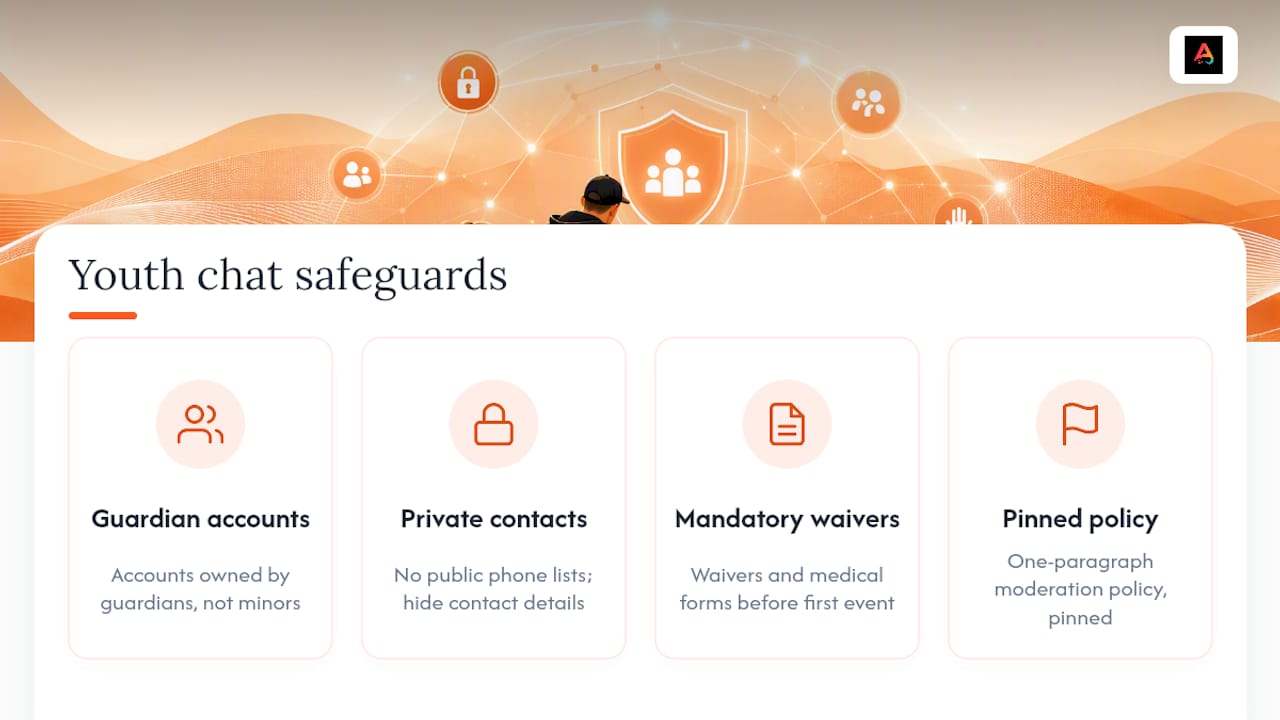
Require guardian accounts, not player accounts, for anyone under 18. A minor should never need their own phone number, email, or device tied to the team chat. Every message, RSVP, and notification should route through a parent or guardian’s account instead.
Never publish a phone number list. Public number sharing is how youth team group texts turn into a privacy liability the moment a parent leaves the team on bad terms or a number gets passed along without permission. In-app messaging that never exposes raw contact details solves this, and direct messages between non-guardian adults should be restricted by default.
Make digital waivers and medical forms mandatory before the first event, not optional paperwork that trails in later. A player who has not completed a concussion waiver or listed an allergy should not be able to RSVP yes to a practice.
Write a moderation policy in one paragraph and pin it, do not leave it as an unwritten assumption. State who can post where, what happens if someone violates the code of conduct, and how a parent reports a problem.
Verify RSVPs against your actual roster, especially for events with paid entry or limited slots, so a plus-one or an uninvited player cannot show up without anyone noticing until they are standing on the field.
A single mandatory signup flow for guardians combined with a required digital waiver before the first event does more to reduce liability and prevent no-shows than any amount of after-the-fact policing, according to guidance built specifically around youth team chat safety.
Youth team communication should never rely on trust alone. Guardian-first accounts, protected contact information, and waivers attached directly to events are the baseline, not the upgrade, for any team with players under 18.
Coaches who treat these rules as optional tend to discover why they exist the hard way, usually mid-season, usually at the worst possible time.
Ready-to-Use Message Templates and Workflows Coaches Can Copy
The fastest way to get a team chat running smoothly is to stop writing every message from scratch. Copy these, adjust the details, and you have covered the five messages every coach sends on repeat.
- Season welcome and code of conduct: “Welcome to the [Team Name] [season] season! This channel is for team announcements only. Please review the pinned code of conduct and complete the linked waiver before our first practice on [date]. Questions go in the Parent Q&A channel.”
- Practice reminder with RSVP and field map: “Practice reminder: [day] at [time], [field name and map link]. Please RSVP by [time] so we can plan drills. Bring water and cleats, no metal spikes on the turf field.”
- Last-minute cancellation: “Practice is canceled tonight due to [weather/field conditions]. We’ll pick back up [next date]. No need to reply, this is a one-way heads-up. Check the schedule channel for the updated calendar.”
- Volunteer request and shift signup: “We need two parent volunteers for [event] on [date]: one for check-in table, one for water/snack duty. Reply with which shift works and we’ll lock it in on a first-come basis.”
- Incident report that protects privacy: “An incident occurred during today’s [practice/game] involving a player. Details are being handled directly with the families involved and are not appropriate for the group chat. If you have a concern, please message [coach/manager] directly.”
That last template matters more than it looks like it does. Posting incident details in a group channel, even with good intentions, almost always makes things worse. Keep it out of the public feed and handle it one-on-one.
Integrating Chat With Roster, Forms, Payments, and Game-Day Workflows
A team chat that sits by itself, disconnected from your roster and your event calendar, only does half the job. The real value shows up when messaging, RSVPs, and paperwork all pull from the same data.
- Attach waivers and medical forms directly to each event, so a guardian cannot RSVP yes without the form already on file. This closes the gap where a player shows up to a game with no allergy information on record.
- Use RSVP responses to build your lineup and notify substitutes automatically, instead of texting five different backup players individually when someone drops out the morning of a game.
- Keep ticketing and payment steps low-friction for youth events. A parent paying a small tournament fee or event charge should not need to leave the chat, dig up a credit card, and navigate a separate site. QR-based check-in and simple in-app payment cut that friction, which matters when you are dealing with a parent trying to handle this from a parking lot between drop-offs.
- Post live-score or game update links directly in the game-day channel so a parent stuck at work can follow along without calling the sideline every ten minutes.
Coordinating rosters gets easier when your player records stay current in one place rather than scattered across spreadsheets and old sign-up sheets. A tool like AuksPort’s player database can help keep that roster data organized as a companion piece to whatever chat system you run, especially for clubs managing multiple teams across a season.
None of this requires a technical background to set up. It requires deciding, once, that your chat should talk to your calendar and your forms instead of living in isolation.
Moderation Policy, Escalation Steps, and Low-Effort Governance
Good moderation should take almost no ongoing effort if the structure is right from the start. Here is a governance approach that holds up without turning you into a full-time chat administrator.
- Assign three roles up front: owner, coach or moderator, and a parent representative. The owner controls channel structure and permissions, the moderator handles day-to-day posts, and the parent rep gives families a non-coach contact for concerns.
- Pin the rules where nobody can miss them, and keep the policy short enough that people actually read it, three or four lines, not a page.
- Follow a three-step escalation policy for violations: warn, mute, remove. Document each step with a timestamp, even informally, so there is a record if a dispute comes up later.
- Set quiet hours and filters to cut off-hours noise automatically, rather than relying on parents to self-regulate when they post.
- Escalate to club or league leadership only when a documented pattern exists, not on a single complaint. Save the incident notes so leadership has context instead of just a he-said-she-said summary.
This is also where light automation earns its keep. Some chat tools now offer AI summaries that pull decisions and action items out of a busy thread, cutting down the time anyone spends scrolling to figure out what actually got decided. A daily digest of that sort, even a simple one, saves a coach from having to reread forty messages to find the one that mattered.
How Chat Fits Into the Rest of Your Sports Management Setup
A team chat that cannot talk to the rest of your season admin becomes just one more app competing for attention. The strongest setups treat chat as the front door to everything else, roster management, scheduling, and payment processing, rather than a standalone messaging tool bolted on top of a separate system.
This matters most when a club runs multiple teams across multiple sports, each with its own calendar, coaching staff, and family list. Instead of a coach manually copying schedule changes from a spreadsheet into a group text, the chat should pull directly from the same event data that drives RSVPs and check-in. When those systems are connected, an updated practice time in the calendar shows up automatically as a chat notification, no separate manual message required.
The practical test is simple: if you have to update three different places every time a game gets rescheduled, your system is not integrated, it is just several apps sitting next to each other. Look for a setup where the roster, the calendar, the forms, and the chat all pull from one source of truth.
Can You Manage Team Chat Across Phone, Desktop, and Web?
Coaches need mobile access on the sideline, but plenty of season admin, building a full calendar, reviewing waivers, setting up channel structure, is genuinely easier on a bigger screen. A chat system that only works well on a phone forces you to do detailed setup work on a small screen with your thumbs, which nobody wants after a long practice.
The practical standard to look for: mobile access for real-time updates during practices and games, with the option to handle heavier admin tasks, like building out a season schedule or reviewing a stack of medical forms, wherever you have a keyboard. Parents mostly live on mobile, checking notifications between errands and work, so the notification and RSVP experience needs to be fast and simple on a phone even if the coach occasionally sets things up elsewhere.
Consistency across devices matters more than raw feature count. A channel structure that looks different or behaves differently depending on whether you are on a phone or a browser creates confusion at exactly the moment you need clarity, usually right before a game.
Author Perspective: A Coach-First Take on What Really Works
Most advice about team communication focuses on volume, more updates, more reminders, more check-ins. That is backwards. The teams with the smoothest seasons are not the ones sending the most messages. They are the ones sending the fewest messages that actually matter, because the structure around those messages is doing the work instead.
The uncomfortable truth is that most chat chaos is self-inflicted. A coach who dumps everything into one thread and then wonders why parents miss the field change is not dealing with a technology problem. Fix the channel structure and the quiet hours before you blame the app.
— Abdulazeez
How Athlo Solves This in One App
Athlo is the alternative to juggling a group text, a separate calendar app, a paper waiver folder, and a Venmo request thread, all for the same team. It brings team chat, RSVP and attendance tracking, digital waivers and medical forms, LinkUp pickup game discovery, live scores, and a coaching marketplace into one hub, so a parent managing their kid’s sports life does not need five different logins to stay current.

That consolidation is not a minor convenience. Every feature in the checklist earlier in this guide, guardian-first accounts, pinned announcements, RSVP tracking tied to waivers, moderation controls, maps directly onto what Athlo’s team management tools already handle, because the app was built around the way youth teams actually communicate, not around a generic messaging template. Parents get a single account to track their child’s sports life without needing the kid to have a device of their own, and coaches get RSVP, forms, and chat pulling from the same roster instead of three disconnected spreadsheets. Athlo offers a Free plan alongside Athlo Plus at $3.99 per month and Athlo Pro at $7.99 per month, so a team can start with the basics and scale up as needs grow, all available at Athloapp.
Download Athlo from the App Store or Google Play and set up your first team chat before your next practice.
Sources
The recommendations in this guide draw on a review of communication practices in sports teams that frames good coaching communication around managing uncertainty, and on an ecological perspective on intra-team communication that supports structuring chat by function rather than by habit. Athlo’s own youth team chat safety guidance informed the guardian-account and waiver-first rules throughout.
- An ecological perspective on intra-team communication in team sports
FAQ
What Is the Best Way to Manage a Sports Team Chat?
The most effective approach combines a dedicated app like Athlo with a clear channel structure, meaning separate spaces for announcements, schedules, and staff-only talk, rather than one flat group text. Pin key documents, require guardian accounts for minors, and attach RSVPs directly to your calendar so attendance tracking happens automatically.
How Do I Stop a Group Text From Getting Out of Control?
Split it into function-based channels, announcements, practice logistics, and game day, so people know exactly where to look and where to post. Set quiet hours and assign a moderator so off-hours noise and off-topic replies get filtered before they reach every parent’s phone.
Should Youth Players Have Their Own Chat Accounts?
No. Guardian accounts should handle all messaging and RSVPs for players under 18, keeping phone numbers and personal contact details out of any shared list. This single change, paired with mandatory waivers before the first event, meaningfully reduces liability and prevents unauthorized attendance, according to Athlo’s youth chat safety guidance.
Does Athlo Cost Anything to Use?
Athlo offers a Free plan, with optional upgrades at $3.99 per month for Athlo Plus and $7.99 per month for Athlo Pro, all listed at Athloapp. Team chat, RSVPs, and waiver management are part of the core team management experience described on Athlo’s site.
Can Parents Access Team Chat on a Computer Instead of a Phone?
Coaches typically need mobile access for real-time updates on the sideline, but heavier admin tasks like building a season calendar or reviewing forms are often easier on a larger screen. Look for a system where notifications and RSVPs stay consistent whether a parent checks in from a phone or a browser.