Copyable U.S. Youth Sports Ticket Refund Policy: 4 Things to State
Every sports ticket refund policy needs four things stated before anyone taps “buy”: the refund options (refund, exchange, or credit), an exact deadline, a support contact, and what happens to the QR ticket once money moves. Refunds go back to the original payment method through your processor, and the QR code should only die after that refund clears. Keep the order number, receipt, and QR ID on file. That combination is what stops a rainout or a duplicate charge from turning into a screaming match at the gate.
TL;DR:
- Refund policies should clearly specify the refund options, deadlines, support contact, and proof required, with consistent language across all communication channels.
- Refund processing must be separated from ticket access, only invalidating QR codes after refunds fully post through the payment processor to prevent double refunds.
- State laws and ADA requirements may impose additional obligations, such as refund rights and accessible entry options, which must be explicitly addressed.
- Gate staff should verify purchase details when QR codes fail, using order records and manual alternatives, not solely rely on scanner apps.
- Transparency at checkout, including clear refund terms and contact info, reduces disputes and helps ensure consistent enforcement of refund policies.
Table of Contents
- What Should a Sports Event Refund Policy Table Look Like?
- How Should the Refund Workflow Actually Run?
- What Legal and Accessibility Boxes Do You Need to Check?
- What Should Gate Staff Do When a QR Code Fails?
- What Checkout and Receipt Language Actually Covers You?
- Why Checkout Clarity Beats Gate-Day Improvisation
- Run Your Next Event Without the Spreadsheet Chaos
- Sources
- FAQ
What Should a Sports Event Refund Policy Table Look Like?
Nobody wants to read three paragraphs of legal language while standing at a gym door in the rain. A short table settles most fights before they start, and it works because it removes the guesswork for whoever is running the scanner that day. The FTC’s guidance on refunds and resolutions backs this up directly: buyers and small sellers both do better with a plain decision structure than with a wall of policy text nobody reads until there’s a problem.
Here’s a version you can copy onto your event page or ticketing app description:
- Buyer cancels before deadline: Full refund or credit, no fee, processed to original payment method, requires order number.
- Organizer cancels the event: Full refund automatically, no request needed, processed within your stated window.
- Event postponed to a new date: Ticket carries over automatically; refund only if buyer requests one within a reasonable period after the new date announcement.
- Weather or venue closure: Treated as cancellation if the facility closes; full refund, triggered by organizer notice, not by a parent’s guess about conditions.
- Duplicate or failed payment: Refund the duplicate charge immediately upon proof of two charges for one ticket, no deadline restriction.
- QR code won’t scan: Not a refund issue by default; gate staff verify by order number or name first.
- No-show: Non-refundable unless your policy states otherwise; this is the one row where “no refund” is standard and fair.
- Organizer cancels a specific ticket for misconduct: No refund, but state this clearly in your policy up front so it isn’t a surprise.
Every row needs the same five details: who qualifies, what they get, by when, whether a fee applies, and what proof they need to show. Skip any of those five and you’ve built a policy that generates more questions than it answers.
How Should the Refund Workflow Actually Run?
Payment and ticket access are two separate systems that need to stay in sync, and most gate-day disasters happen when they drift apart. The FTC’s May 2025 rule on unfair or deceptive fees requires mobile sellers to show the total price, including every mandatory fee, and to say plainly whether that fee is refundable, before the buyer ever agrees to pay. That disclosure has to happen at checkout, not buried in a follow-up email.
Once someone actually requests a refund, the workflow looks like this:
- Confirm the request against the order record: order number, purchaser name, event date, and either the QR ticket or the receipt.
- Process the refund against the original charge or PaymentIntent in your payment processor rather than issuing a new manual payout.
- Wait for confirmation that the refund has actually posted before touching the ticket record.
- Invalidate the QR code only after that confirmation, and log the invalidation with a timestamp.
- Keep the scan logs and the exact policy version the buyer accepted at checkout, since that snapshot is your best evidence if a dispute comes later.
Stripe’s documentation on handling payment events recommends exactly this separation: treat the QR code as an access credential, not a stand-in for the payment record, and let payment events (not spreadsheets) drive when a ticket goes dead. Refunds through card processors typically take several business days to appear on statements, so tell buyers that up front instead of letting them assume it’s instant.
Pro Tip: Never kill the QR code the moment a refund request comes in. Wait for the processor’s confirmation. A ticket that goes dark before the refund actually posts is how you end up refunding someone twice, once through the bank and once through a manual “sorry, let me fix that” payment.
What Legal and Accessibility Boxes Do You Need to Check?
Three agencies matter here, and none of them are optional reading if you’re taking money for a youth game.
- The FTC requires total-price and refundability disclosure at checkout and bans vague or misleading fee language, so “processing fee” without saying whether it’s refundable is a problem.
- State rules aren’t uniform. The NCSL’s 2024 survey of state ticketing legislation shows some states mandate refunds for cancellations or invalid tickets, so check your state’s statute rather than assuming a national default applies.
- The ADA’s guidance on ticket sales says organizers should publish an accommodation contact and spell out how a buyer without a QR-capable phone, or with a disability, can still get in.
One more thing worth saying plainly: encouraging a buyer to contact your support line first is good practice, but it never replaces their right to dispute a charge with their bank. Don’t write your policy as if it does.
What Should Gate Staff Do When a QR Code Fails?
A QR code is a credential, not proof of anything by itself, and treating it that way keeps volunteers from turning away a paying family over a dead phone battery.
- Pull up the order record before refusing anyone entry. A failed scan is a tech problem, not automatic grounds for denial.
- Ask for order number, purchaser name, the last four digits of the card used, or a receipt screenshot as backup verification.
- Staff the gate with someone who has phone or tablet access to the order list, not just the scanner app.
- Keep a printed ticket or manual wristband option on hand for accessible-entry cases, as Athlo’s guide on buying youth sports tickets recommends for exactly this scenario.
- If a ticket was refunded, mark it invalid in the system immediately and brief gate staff so a stale QR code doesn’t get scanned twice by accident.
Mobile ticket scanning done right at the door usually comes down to having a human fallback, not a perfect app. Build that fallback in before game day, not during it.
What Checkout and Receipt Language Actually Covers You?
Short and specific beats long and vague every time here. Your checkout screen needs one sentence: refundable or not, deadline, and how to reach support. A ticketing partner like Ocean Theatre Co.'s booking information page shows a clean example of stating price and refund terms in plain language before the customer clicks “confirm.”
- Checkout blurb: “Tickets are refundable until [date]. Questions? Email [contact] or text [number].”
- Receipt copy: Confirm the order number and QR ID, and link straight to your full policy page.
- Full policy page: Include the decision table, expected refund timeline, how refunds are routed, your accessibility contact, and a note on dispute rights.
- Placement checklist: checkout screen, confirmation screen, receipt email, and the event listing itself. Four places, same wording every time.
Pro Tip: Copy your refund policy word for word between your event page, checkout screen, and receipt email. A “close enough” rewording in one spot is exactly what a parent will screenshot and use against you in a dispute.
Why Checkout Clarity Beats Gate-Day Improvisation
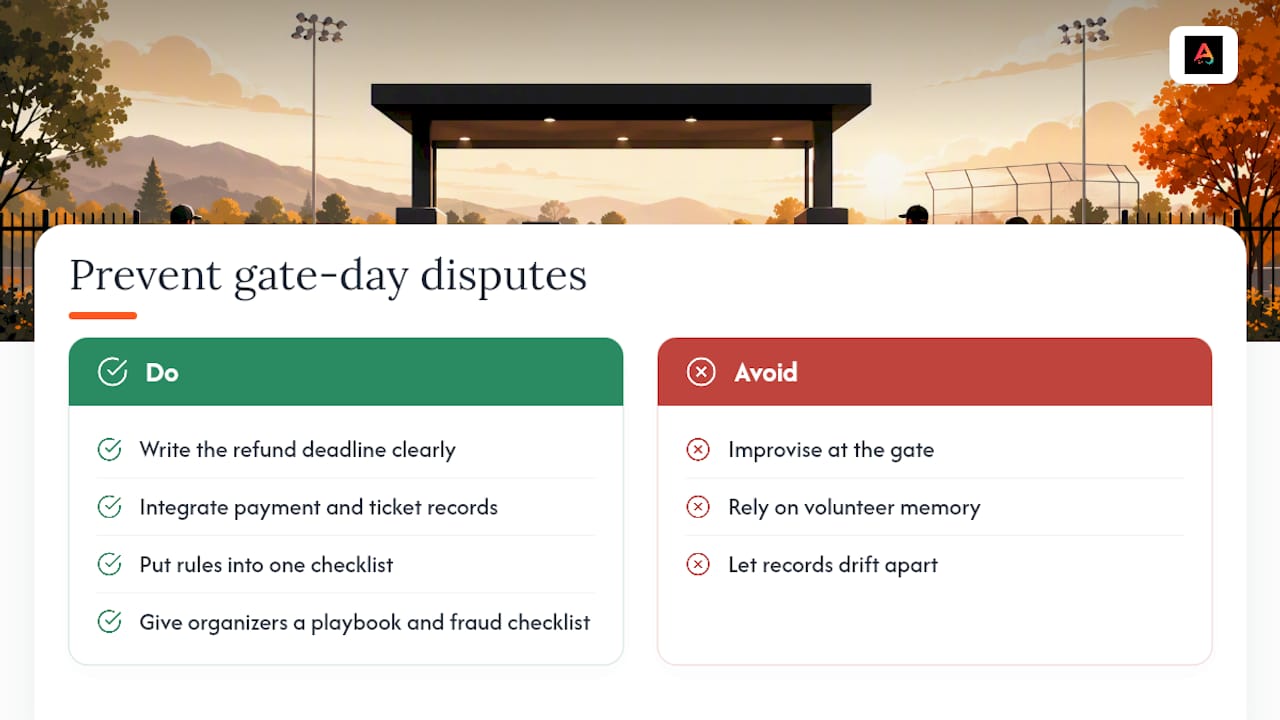
Most refund disputes start three weeks before the event, not at the gate. A parent buys a ticket, doesn’t see a deadline anywhere, and shows up assuming the rules will bend for them. Write the deadline down once, clearly, and most of that friction disappears before it starts.
Payment records and ticket records that drift apart cause the rest of the mess. If your refund system doesn’t talk to your ticketing system, you’re relying on a volunteer’s memory at 7 p.m. on a Friday, and that’s not a system, that’s a hope. Building both into the same checklist, and giving small organizers Athlo’s own playbook and fraud-prevention checklist to work from, is what actually keeps gate day boring in the best way.
— Abdulazeez
Run Your Next Event Without the Spreadsheet Chaos
Athlo is the alternative to juggling a separate payment app, a paper ticket log, and a group text for refund requests. Everything, from selling the QR ticket to processing the refund back to the original card to invalidating that ticket automatically, runs through one system built for youth and high-school organizers, not stadium-scale ticketing companies.

Athlo’s event ticketing feature handles QR check-in and Apple Wallet passes so your gate staff aren’t squinting at printed lists, and payments route through the same ledger your refund workflow needs to stay clean. If you’re also managing rosters or booking coaches for the same event, Athlo’s team management tools and coaching marketplace live in the same app. Download Athlo on the App Store or Google Play at Athloapp and set up your next ticketed event before your current spreadsheet gives out.
Sources
- Solving problems with business returns, refunds, and other resolutions — FTC (Sept 10, 2024)
- Ticket sales resources — ADA (April 21, 2026)
FAQ
What Must a Sports Ticket Refund Policy State?
It needs to state the refund options (refund, exchange, or credit), an exact deadline, a support contact, and what proof a buyer must provide. The FTC recommends requiring an order number, purchaser name, event date, and QR ticket or receipt for any refund request.
Do I Have to Refund a No-Show Ticket?
No, a no-show is typically non-refundable unless your own policy says otherwise. State this clearly at checkout so it isn’t a surprise after the event has passed.
When Should a QR Ticket Be Invalidated After a Refund?
Only after the refund has actually posted through your payment processor, never before. Stripe’s guidance recommends processing the refund against the original charge first, then updating the ticket record, so you never end up refunding a ticket that’s still valid for entry.
Does Athlo Handle Refunds for Event Tickets?
Athlo processes QR-ticketed event payments and supports refund workflows tied to the original payment, along with ticket invalidation once a refund clears. Pricing details for Athlo Plus and Athlo Pro are listed at Athloapp.
What If a State Has Its Own Ticket Refund Law?
State rules vary, and some states require refunds for cancellations or invalid tickets under their own statutes. Check the NCSL’s state legislation survey rather than assuming one national rule covers every event.